Decision model
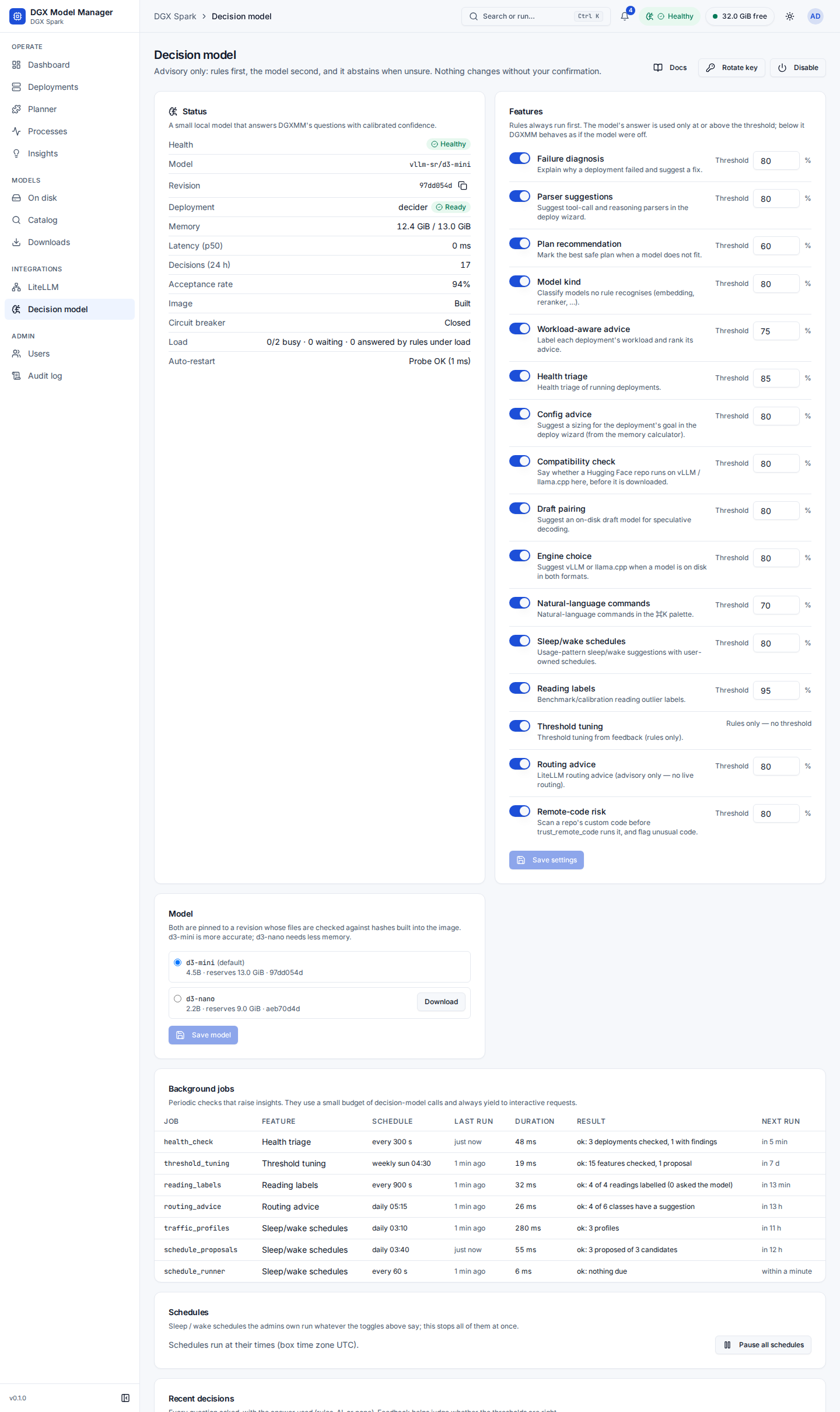
The decision model ("decider") is an optional small local model that DGXMM asks for help with 16 features:
- when something fails or is chosen: failure diagnosis, plan recommendation, model kind;
- in the deploy wizard and the catalog (deploy-time advice): parser suggestions, a suggested config for your goal, the engine, a draft model for speculative decoding, the compatibility check before a download and the remote-code check;
- while deployments run: workload labels, health triage, reading labels, threshold tuning (rules only), routing advice and sleep/wake proposals;
- in the command palette: ⌘K Ask.
It is off by default and purely advisory:
- Rules first. Each feature has deterministic rules that run whether or not the model is on (the diagnosis cards, parser suggestions for known model families, plan safety marks, model kinds, workload labels, clear health findings, the compatibility check, the code scan and the rest described below all work without it). The model is asked only when no rule answers.
- Abstains when unsure. A model answer is used only at or above the feature's confidence threshold. Below it, DGXMM behaves as if the model were off.
- Nothing changes without you. Answers fill in or mark things in the UI or raise an insight. Every change still goes through the normal dialogs (Reconfigure, Deploy, Apply plan), with the memory check, and an admin confirms it. The only thing DGXMM does on its own is run the schedules an admin created.
- Fails open. When the model is off, starting, overloaded, slow or broken, every feature falls back to its rules within its deadline.
The model runs as a system deployment named decider (container dgxmm-decider): it is shown with a
System badge, is never stopped or slept by a plan and is never registered in LiteLLM. When it uses
more than its reservation, or when the watchdog has to free memory (with auto_protect: true), the
watchdog stops it before any of your deployments (see watchdog); DGXMM
starts it again once memory has recovered. It is managed on the Decision model page: its deployment
offers no Switch or Reconfigure, it starts by enabling the decision model, and Remove also turns the
decision model off. Its LiteLLM tab and API access card only say that system deployments aren't
registered in LiteLLM. When another model does not fit, the plan chooser notes how much memory the
decision model holds and that disabling it frees that memory (plans never stop it themselves). The top
bar shows a Decision model chip with its state (Healthy, Building, Starting, Stopping, Sleeping,
Stopped, Disabled or Error). For admins it opens the Decision model page (Integrations > Decision
model, admins only); viewers get a read-only status popup.
Turn it on
From the UI: open Integrations > Decision model and press Enable.
- Image. The decider runs from a local image,
dgxmm-decider:3, built on your machine fromdeploy/decider(a pinned vLLM base and hash-pinned Python packages). If it is not built yet, a dialog offers Build image and shows the build's progress. The first build downloads the base image (about 21 GB) and takes a few minutes; then press Enable now. - Model files. The Model card lists the supported models; one that is not downloaded yet has a Download button. It uses the same downloader as the installer and the CLI: only the pinned revision's files, each checked against its hash before it is used, and a failed download resumes where it stopped when you start it again. Progress shows on the Model card and the Downloads page. d3-mini is 8.5 GiB on disk.
- Memory. Enabling deploys the model through the same memory check as any deployment: it reserves 13 GiB (d3-mini) or 9 GiB (d3-nano). If that does not fit, Make room for the decision model lists sleep and stop plans; nothing changes until you press Apply plan and enable.
- Start-up. The first start compiles GPU kernels and takes a few minutes (2–4 minutes for d3-mini, about 90 seconds for d3-nano). It counts as healthy after a health check, an authenticated test question and three warm-up questions. While it starts, every feature uses its rules.
From the command line, ./install.sh --with-decider builds the image, downloads and verifies the model,
enables it and waits until it is healthy (see operations). The admin CLI
docker exec dgxmm python -m dgxmm.admin decider … does the same steps one at a time.
d3-mini or d3-nano
Two models are supported, both pinned to a revision whose files are checked against hashes built into the image. Measured on a DGX Spark (details in decider-evaluation.md):
vllm-sr/d3-mini (default) |
vllm-sr/d3-nano |
|
|---|---|---|
| Size | 4.5B parameters | 2.2B parameters |
| Memory reserved | 13 GiB | 9 GiB |
| Accuracy on the labelled test set | 0.90 | 0.81 |
| Plan ranking | 0.90 | 0.40 |
| Model kinds | 1.00 | 0.70 |
| Parsers (with option descriptions) | 0.92 | 0.96 |
| Latency per question | baseline | 2–3 × faster, about 3 × the throughput |
| Start-up | 2–4 minutes | about 90 seconds |
Keep d3-mini unless memory is tight or the GPU is shared and latency matters. d3-nano ranks plans much worse (and confuses drafts and speech models with LLMs), but because of the thresholds most of its weak answers become abstentions rather than wrong suggestions. To switch, pick the model on the Model card, Save model, then Restart with … (shown while the decider runs). The same deployment is restarted with the other model; if it fails to start, DGXMM rolls back to the previous model.
What you see
Every answer carries its source:
- Rules: a deterministic rule matched (certain by construction);
- 87% · AI: the decision model answered, with its confidence;
- nothing, or Couldn't diagnose confidently: no rule matched and the model abstained (or is off).
Admins can rate answers with the thumbs up / down buttons (Helpful / Not helpful) on diagnosis cards and in the decision log. Feedback does not change answers; it shows whether the thresholds fit your models (the page shows the Acceptance rate).
Failure diagnosis
When a deployment fails, a Diagnosis card appears at the top of its Overview tab a few seconds
later: the cause (for example Out of GPU memory, KV cache too small for the context, Context longer
than the model supports, Gated model: Hugging Face token needed, Invalid tool-call or reasoning
parser, Port already in use, Disk full), its source, a short summary, a fix hint and the redacted
log excerpt. When the cause has a known fix, admins get Apply fix…: it opens Reconfigure with
the change filled in (for example a shorter max_model_len, or a valid parser), so you can review it,
see the memory check and apply it (with automatic rollback). trust_remote_code: true is only ever
suggested when a rule found the transformers error that asks for it, and the dialog then warns that the
engine will run the repository's own code. Rules cover 14 causes; the model is asked only when none
matched (threshold 80 %).
Parser suggestions
In the deploy wizard, for vLLM models, the tool-call parser and reasoning parser fields under advanced options show a suggestion such as Suggested: hermes · Rules:
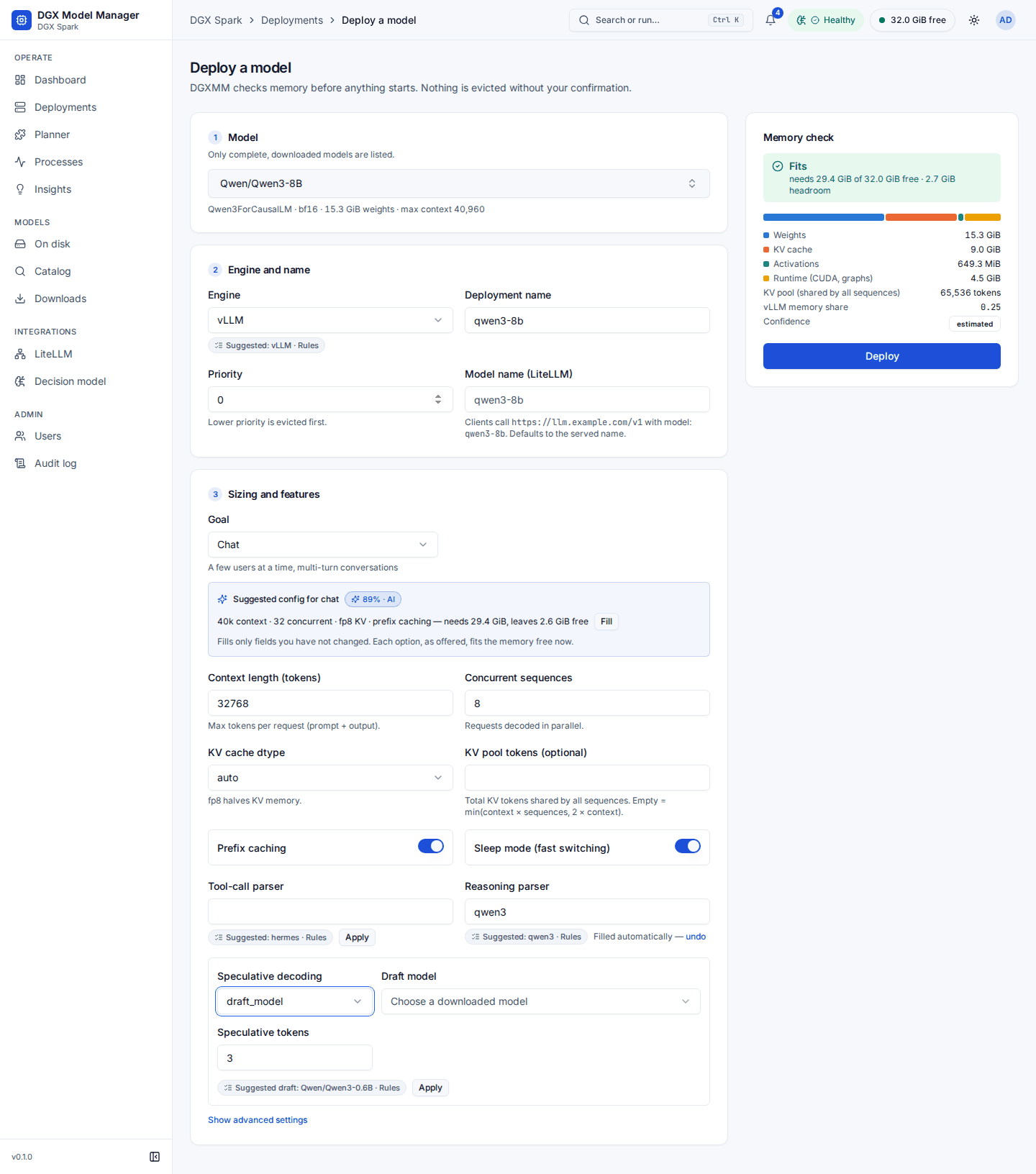
- Filled automatically — undo: the field was empty and untouched, and the suggestion comes from a strong rule (the model's chat template) or from the model at or above the parser threshold (80 %). undo clears it.
- Apply: a weaker suggestion (a rule from the model's name or family only, or a model answer between 50 % and the threshold). Nothing is filled until you press it.
- A value you typed is never overwritten. Model answers below 50 % are not shown. A model answer is never filled in automatically when the chat template or model name contains text shaped like an instruction to the decider.
A wrong parser only makes that deployment fail to start, and the diagnosis then says Invalid tool-call or reasoning parser. The parser questions have a 4 s deadline; the wizard fetches them in the background.
Plan recommendation
When a model does not fit, the plans under Ways to make it fit are first checked by the fixed safety rules described in Deploy a model. If exactly one plan is safe, it is Recommended by the rules. If several are safe, the decision model ranks only those, and its choice is recommended when its confidence reaches the plan threshold (60 %), with a reason such as "frees 14.0 GiB; chat-small idle 3 h".
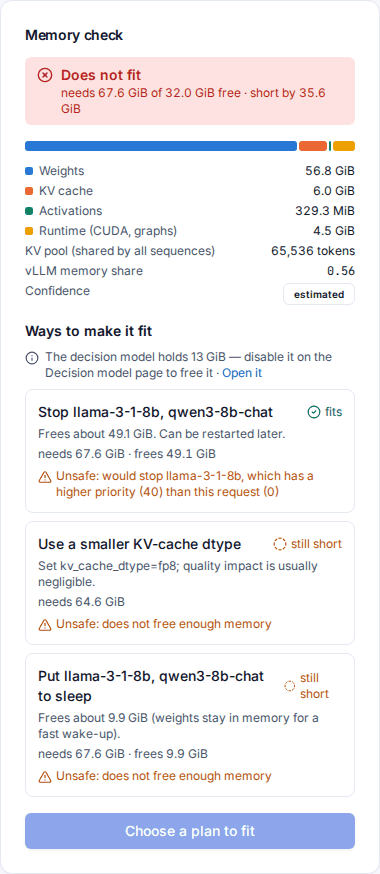
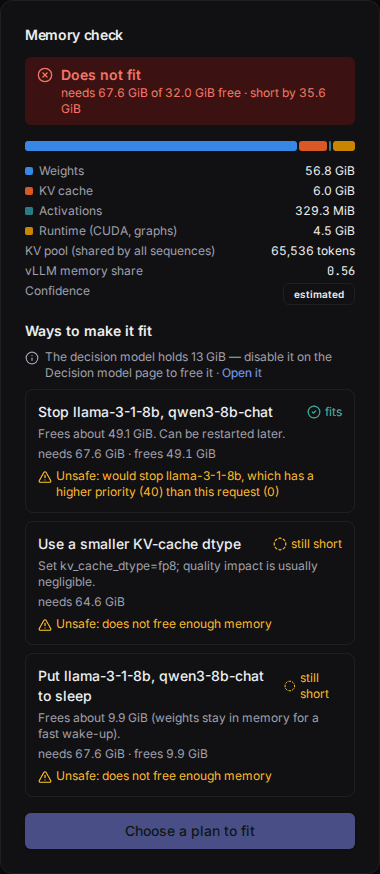
Plan ranking is the weakest of the model's features (d3-mini 0.90 on the labelled set but with little real-world data; d3-nano 0.40). The safety filter always runs first, so the model only ever chooses among plans that are already safe: a weak ranking can make a less convenient safe plan the recommended one, never an unsafe one. Read the plans yourself before you apply one.
Model kind
Models on disk are classified as LLM, draft, embedding, reranker, vision LLM, speech, decision (for example classifiers and guard models) or other. Rules decide for nearly every model. For a model no rule recognises, the decision model is asked once per snapshot in the background (threshold 80 %), and the Kind column shows an AI marker with its confidence. The kind decides which engines and wizard lists offer the model.
Workload-aware advice
For a ready deployment with at least 30 minutes of metrics in the last hour, DGXMM summarises its traffic (requests in flight, queueing, prompt and output sizes, idle time) and labels it: Single-user chat, Agent / tool use, Batch throughput, Long-context RAG, Idle or Mixed. Clear patterns (for example idle, or a saturated batch) are labelled by rules; otherwise the model is asked (threshold 75 %). The label is shown on the Advice tab as Workload: Batch throughput · 93% · AI, and the advice that matters for that workload is listed first under Most relevant for this workload. The label is refreshed every 15 minutes. It only orders the advice; it never applies anything.
Health triage
Every 5 minutes DGXMM checks each ready deployment's recent metrics (KV-cache usage, preemptions, requests running and waiting, throughput against its own 24-hour baseline, 4xx and 5xx answers) and its log. Clear cases are decided by rules; the decision model is asked only about ambiguous windows (health threshold 85 %). Findings become insights:
- KV cache pressure (the KV cache is full and requests are preempted) and Frequent preemptions: the suggested fix is, in order of preference, an fp8 KV cache, a larger KV pool when it fits, prefix caching, or fewer concurrent sequences (llama.cpp: a q8_0 K cache or fewer parallel slots). Reconfigure… opens Reconfigure with the first fix filled in and the memory check;
- Throughput drop (below half of its baseline at similar load), Rising server errors and Clients send bad requests (prompts over the context limit, malformed requests): Open deployment.
Reading labels
Each new benchmark level and each start-up memory measurement is compared with earlier readings of the same model, configuration and engine, with what else happened on the host at that time, and with whether it was the first run after a start. It is labelled Plausible, Contended (other work disturbed it), Cold cache (first run after the start) or Broken (no real measurement). Only plausible readings feed calibration and benchmark advice; the others stay visible on the Benchmarks tab with their badge. A broken benchmark reading raises an insight. Readings the rules cannot decide stay unlabelled and are used as before (the model's answers need 95 % here, which in practice it rarely reaches).
Threshold tuning
Once a week (rules only, no model) DGXMM looks at the answers you rated with Helpful / Not helpful in the last 30 days. For a feature with at least 20 rated model answers it computes the precision at thresholds from 50 % to 95 % and proposes the lowest one whose Wilson 95 % lower bound reaches the target (95 %; commands 90 %), if it differs from the current threshold by at least 5 points. The proposal is an insight with the evidence table; Set threshold to … applies it (audited). With little feedback nothing is proposed: a perfect record needs about 73 rated answers at or above a threshold.
Thresholds and feature switches
The Features card on the Decision model page has, per feature, an on/off switch and a Threshold in percent (a rules-only feature, threshold tuning, shows Rules only — no threshold instead). A switch that is off turns the feature off: DGXMM does not ask the model for it, does not run the feature's own rules (the compatibility check, config advice, draft and engine suggestions show nothing) and does not run its background job. One exception: the remote-code code scan always runs and shows its findings whenever trust_remote_code would be enabled; with its switch off only the model's question is skipped. The checks DGXMM had before the decision model (failure diagnosis, parser suggestions, plan safety marks, model kinds, workload labels, the ⌘K rules) are part of DGXMM itself and stay; for those features the switch only stops the model from being asked. This is not the same as disabling the decision model itself: then every feature, and every job, still runs its rules. Defaults, from the evaluation on real data (decider-evaluation.md):
| Feature | Default threshold |
|---|---|
| Failure diagnosis | 80 % |
| Parser suggestions (tool-call and reasoning) | 80 % |
| Plan recommendation | 60 % |
| Model kind | 80 % |
| Workload-aware advice | 75 % |
| Health triage | 85 % |
| Config advice | 80 % |
| Compatibility check | 80 % |
| Draft pairing | 80 % |
| Engine choice | 80 % |
| Natural-language commands (⌘K Ask) | 70 % |
| Sleep/wake schedules (proposals) | 80 % |
| Reading labels | 95 % |
| Threshold tuning | rules only (no threshold) |
| Routing advice | 80 % |
| Remote-code risk | 80 % |
Switching a feature off also stops its background job, so it raises no new insights, except that schedules you created keep running (see schedules).
A higher threshold means fewer but more reliable model answers. Changes apply immediately and are stored in DGXMM's database (see configuration).
Status and the decision log
The Status card shows health, the model and its revision, the decider deployment and its memory, the median latency, the number of decisions in the last 24 hours, the acceptance rate of rated answers, whether the image is built, and:
- Circuit breaker: after 3 failed questions in a row DGXMM stops asking for 60 seconds and answers by rules ("Paused (rules only)"); a successful health probe closes it sooner.
- Load: questions at the decider, waiting, and answered by rules because the decider was busy. The decider answers one question at a time, so DGXMM keeps at most two at the server; a question that cannot start in time is answered by rules at once.
- Auto-restart: the supervisor probes the decider every 30 seconds and restarts it after a crash or three failed probes, with a growing delay (30 s doubling up to 15 minutes, at most 5 attempts an hour, failed ones included, never while memory is low). It never restarts a decider an admin stopped. When it gives up, the card says why (Gave up — …) and offers Retry.
Recent decisions lists the last 100 questions, newest first: when, the feature, the subject (a deployment links to its page), the choice (or Abstained), the confidence, the source (Rules, AI or None), the latency and the feedback buttons. Filter it by feature. The log stores a hash of each question's input, never the log text or template itself. It keeps 30 days and at most the newest 50 000 rows; rated rows (what threshold tuning learns from) are kept 180 days.
Background jobs
The Background jobs card lists the periodic checks that raise insights, with their schedule, last run, duration, result and next run:
| Job | When | Feature |
|---|---|---|
health_check |
every 5 minutes | Health triage |
reading_labels |
after each new reading, and every 15 minutes | Reading labels |
traffic_profiles |
daily 03:10 | Sleep/wake schedules |
schedule_proposals |
daily 03:40 | Sleep/wake schedules |
schedule_runner |
every minute | runs your schedules |
routing_advice |
daily 05:15, and after deployment changes | Routing advice |
threshold_tuning |
Sundays 04:30 | Threshold tuning |
Times are in the box's time zone (DGXMM_TZ, see configuration).
The jobs run their rules even when the decision model is off. Their questions to the model have a small
budget per run and always wait behind interactive questions (the wizard, the palette), so they cannot
slow the UI down. A job that fails three times in a row raises one … is degraded insight and is
retried with a growing delay (up to an hour); the insight goes away with the next success.
Turn it off
Disable (with confirmation) stops the decider deployment and releases its memory; every feature
continues with its rules. The model files, the image and your settings are kept, so Enable brings it
back. To also delete the deployment record, use
docker exec dgxmm python -m dgxmm.admin decider disable --remove. With --with-decider remembered in
.env, the installer leaves a decider you disabled off (see
operations).
API key and the upgrade banner
DGXMM talks to the decider with a bearer key that it generates itself and never shows. Rotate key
writes a new key and restarts a running decider with it (a few minutes, during which the features use
their rules). The same is available as POST /api/decider/rotate-key and
docker exec dgxmm python -m dgxmm.admin rotate-decider-key.
After a DGXMM upgrade, a decider started by an older version keeps running as it was. When its container no longer matches what this version expects (another image tag, the key in its environment, a published port, root user, a writable root filesystem or the wrong network), the page shows a banner The running decision model predates this DGXMM version with the reasons and a button: Build image… if the new image is missing, then Restart with a new key. See upgrading a decider started by an older build.