LiteLLM
DGXMM registers every ready deployment in LiteLLM once, under its model
name. On-demand deployments stay registered while they are stopped, so that a request can
start them. Clients then use one OpenAI-compatible endpoint, <LiteLLM URL>/v1, and choose the deployment
with "model": "<model name>". LiteLLM adds API keys, budgets, rate limits and logging. To set up the
LiteLLM side, see configuration.
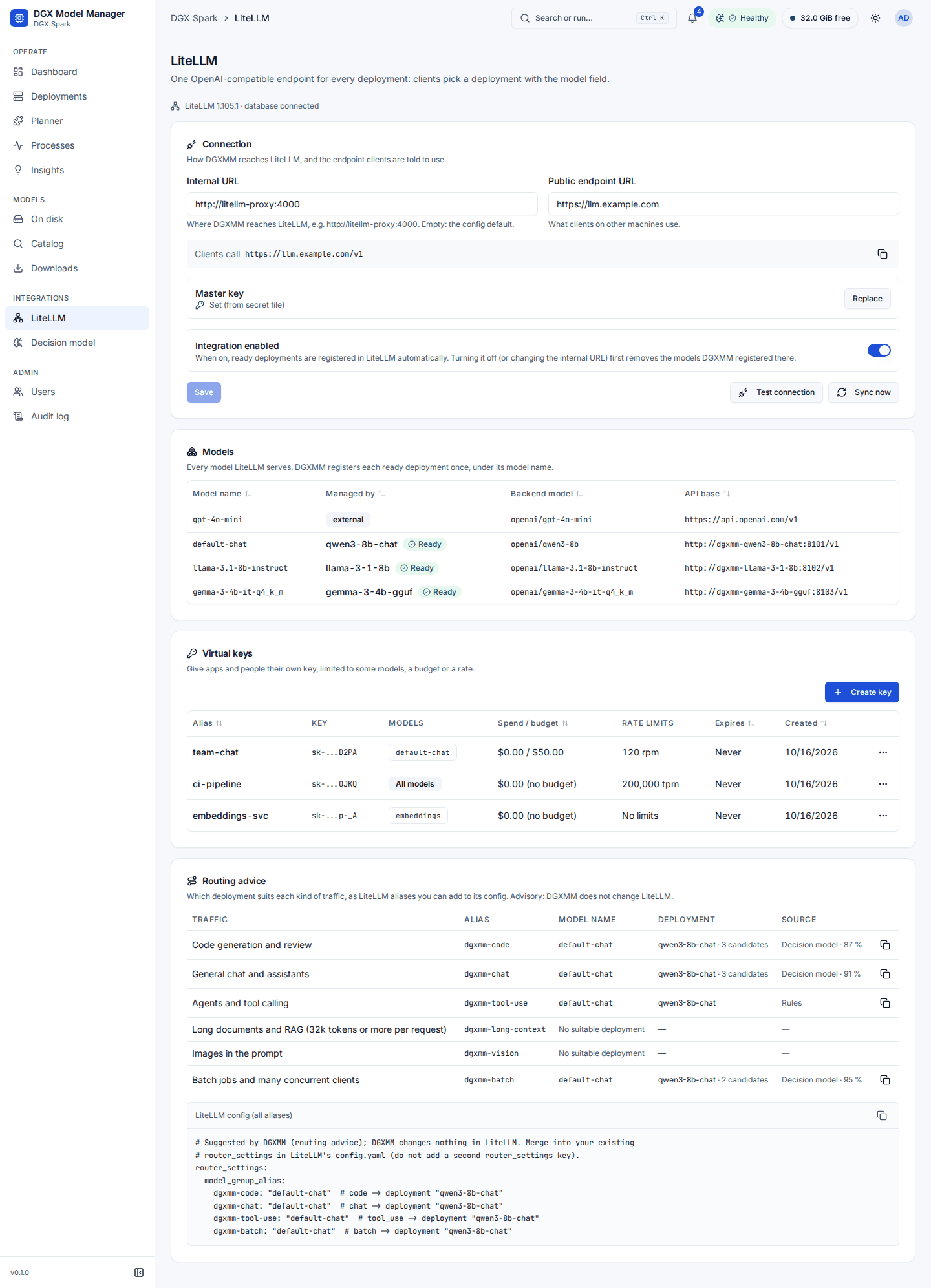
The LiteLLM page (admins, under Integrations) has three parts. Notices at the top say when LiteLLM cannot be reached, no master key is set, or the integration is turned off. When LiteLLM is reachable, its version and database state are shown. The settings appear straight away; the connection status shows "Checking LiteLLM…" until the probe answers.
Connection
- Internal URL: how DGXMM reaches LiteLLM, for example
http://litellm-proxy:4000. Empty means thelitellm_urlfromconfig.yaml. - Public endpoint URL: what clients use, for example
https://llm.example.comorhttp://<dgx-ip>:4000. The preview below shows the resulting endpoint (Clients call …/v1) with a copy button. When it is empty, the internal URL is shown instead, with a hint. - Master key: shows whether a key is set and where it comes from (settings or the secret file). The key is write-only: Replace (or Set key) stores a new one, and Clear removes a key stored in DGXMM so the secret file applies again. A master key is only ever used with the URL it was entered for. If you change the internal URL, the page asks you to enter the master key for the new URL.
- Integration enabled: when off, deployments are not registered.
- Turning it off, or changing the internal URL, first removes the models DGXMM registered in the LiteLLM it is leaving (only entries DGXMM created; models added by hand are untouched), using that LiteLLM's own master key. The toast says how many were removed. If that LiteLLM cannot be reached, the settings are still saved and a warning says how many DGXMM models may remain there and at which URL: delete them in that LiteLLM, or re-enable the integration with that URL so DGXMM cleans up.
- Save and Discard changes. Test connection checks that LiteLLM answers and accepts the master key, and shows the version, database state and model count. Sync now registers and removes models right away and reports the counts. Both use the saved settings.
Models lists every model LiteLLM knows: its name, which DGXMM deployment it belongs to (with a link and state) or "external" for models added outside DGXMM, the backend model and its API base.
Model names DGXMM did not create. A model name must be unique across all of LiteLLM, not only across
DGXMM's deployments: LiteLLM load-balances between entries with the same name, so a static entry in
LiteLLM's config.yaml (or one another tool added) under a deployment's name would receive part of its
requests. DGXMM therefore refuses to deploy, start, wake or rename into such a name ("LiteLLM already has a
model named … that DGXMM didn't create (static config or another tool)"): pick another model name, or remove
that entry from LiteLLM first. If the clash appears later (for example LiteLLM restarts with an old
config.yaml), the deployment's LiteLLM status turns Name conflict and a warning insight points to the
LiteLLM page (the other entry's host is shown to admins only, on the deployment's LiteLLM tab and in
Models); DGXMM keeps its registration but never adds a second one, and the status and insight clear by
themselves once the duplicate is gone. DGXMM never edits or deletes entries it did not create. When LiteLLM's
model list cannot be read, these checks are skipped and nothing is blocked.
Virtual keys lists LiteLLM's keys: alias, key prefix, the models it may call ("All models" when unrestricted), spend and budget, rate limits, expiry and creation date. Keys need a LiteLLM database; without one this part explains how to add it.
- Create key: an alias, the models (DGXMM model names, or All models (including ones added
later)), an optional Max budget (USD) with Budget resets every, Requests per minute,
Tokens per minute and Expires after (for example
30d). The new key is shown once, with a copy button and acurlexample. Closing the dialog before copying asks for confirmation, because the key cannot be shown again. - Edit changes the alias, models, budget and limits, or blocks the key (a blocked key is rejected but kept). LiteLLM cannot remove a limit once it is set; set a higher value instead.
- Revoke deletes the key after you type its alias. Apps using it stop working immediately.
Keys created in DGXMM are tagged in LiteLLM with created_by: dgxmm and your user name. Key changes are
written to the audit log, without the key itself.
Routing advice (when the decision model's routing feature is on) lists, per traffic class, the deployment that suits it best and a LiteLLM alias for it; see routing advice.
Routing advice
For six traffic classes (code, chat, tool use, long context, vision, batch) DGXMM picks the deployment that suits each best: rules keep the capable ones (a tool-call parser for tool use, a vision model for vision, at least 32k context for long context), and the decision model ranks them when there are several. The Routing advice section of the LiteLLM page shows the class, the alias, the model name, the deployment and the source, and a snippet:
Merge it into the router_settings of your LiteLLM config (do not add a second router_settings
key); clients can then call "model": "dgxmm-chat". Only deployments that are ready and registered in
LiteLLM go into the snippet; a better deployment that is asleep or stopped is shown as "would suit;
start